
Turn one product photo into a campaign
Listings · Campaigns · Product fidelityUpload the real product, choose the commercial outcome, and keep logos, labels, shape, and color explicit in the editing contract.
Explore image modelsOne product, several commercial jobs
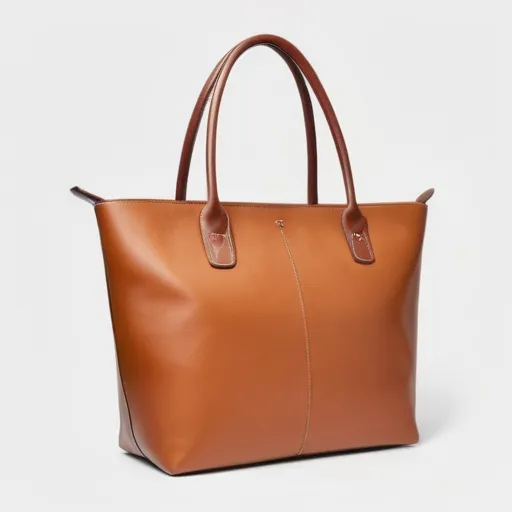
- Purpose
- Make the product easy to inspect
- Direction
- Clean silhouette and contact shadow
- Next variation
- Compare white with soft brand color
Review notes
Neutral commercial background, accurate product color, natural contact shadow, marketplace-ready crop.
Built for repeat product work
Use a plan for regular product-photo production, or add non-expiring credits for an occasional premium scene.
Use the existing background remover when the original scene makes the product boundary unclear.
The workflow names shape, color, logo, label, packaging text, and product details as preserved invariants.
Cheap cleanup can use focused tools; generative scene creation uses plan access or credits.
A result action opens the existing Product Ads Video workflow with the generated image preloaded.
Product fidelity is the release gate
Proofread every character and compare marks, labels, package layout, and product color with the source.
Inspect shape, seams, handles, controls, reflections, transparent parts, and accessories before publishing.
Lifestyle context, scale, shadows, and contact with people or surfaces may be physically inconsistent.
Generated imagery must not visually promise product features, results, ingredients, or certification the product does not have.
How this page was reviewed
Written by giz.ai Product Team · Reviewed by giz.ai Model Operations · Updated 2026-07-16
giz.ai publishes this AI product photo generator page about its own product. Model names, inputs, controls, access, and plan requirements come from the live giz.ai catalog; examples and editorial guidance explain practical use without promising flawless output.
- Match the AI product photo generator default, offered models, and example inputs to active giz.ai model contracts.
- Run the public form through model selection, example application, and the canonical Assistant handoff.
- Verify product upload, fidelity prompt, focused style controls, paid access messaging, and Product Ads Video handoff.
- Verify one canonical URL, visible FAQs, structured data, internal links, desktop layout, and mobile layout.
AI product photo generator FAQ
Will the product stay exactly the same?
No generative edit can guarantee that. The workflow explicitly preserves product invariants, but you must compare logos, labels, text, shape, color, and proportions with the source.
Should I remove the background first?
Use the background remover when clutter, low contrast, or overlapping objects make the product boundary ambiguous. A clean source generally improves control.
Which style should I choose?
Use Clean Studio or Marketplace for listings, Lifestyle for context, Luxury for premium presentation, and Social for an attention-focused campaign asset.
How is product generation billed?
Current included access is shown before generation. Premium scene creation can use a recurring plan or non-expiring purchased credits.
Can I turn the result into a video?
Yes. Use Make product video on the result to open Product Ads Video with the generated image as its starting frame.